> ## Documentation Index
> Fetch the complete documentation index at: https://docs.getenso.ai/llms.txt
> Use this file to discover all available pages before exploring further.
# Invoices & Credit Notes
> Learn how invoices and credit notes are managed in Enso.
## Invoices
Invoices in Enso are generated to bill your customers for products or services.\
Invoices can be created automatically or manually, and each invoice goes through a defined workflow before it is finalized.
***
### How Invoices are Created
* **Auto-generated:** Invoices are automatically created when a contract is set up. All such invoices start in the **Draft** stage.
* **Manual creation:** You can also create invoices manually by navigating to **Invoices** > **Create Invoice** in the dashboard.
Each invoice can have multiple **invoice items**, with each item representing a product or service.
***
### Invoice Lifecycle
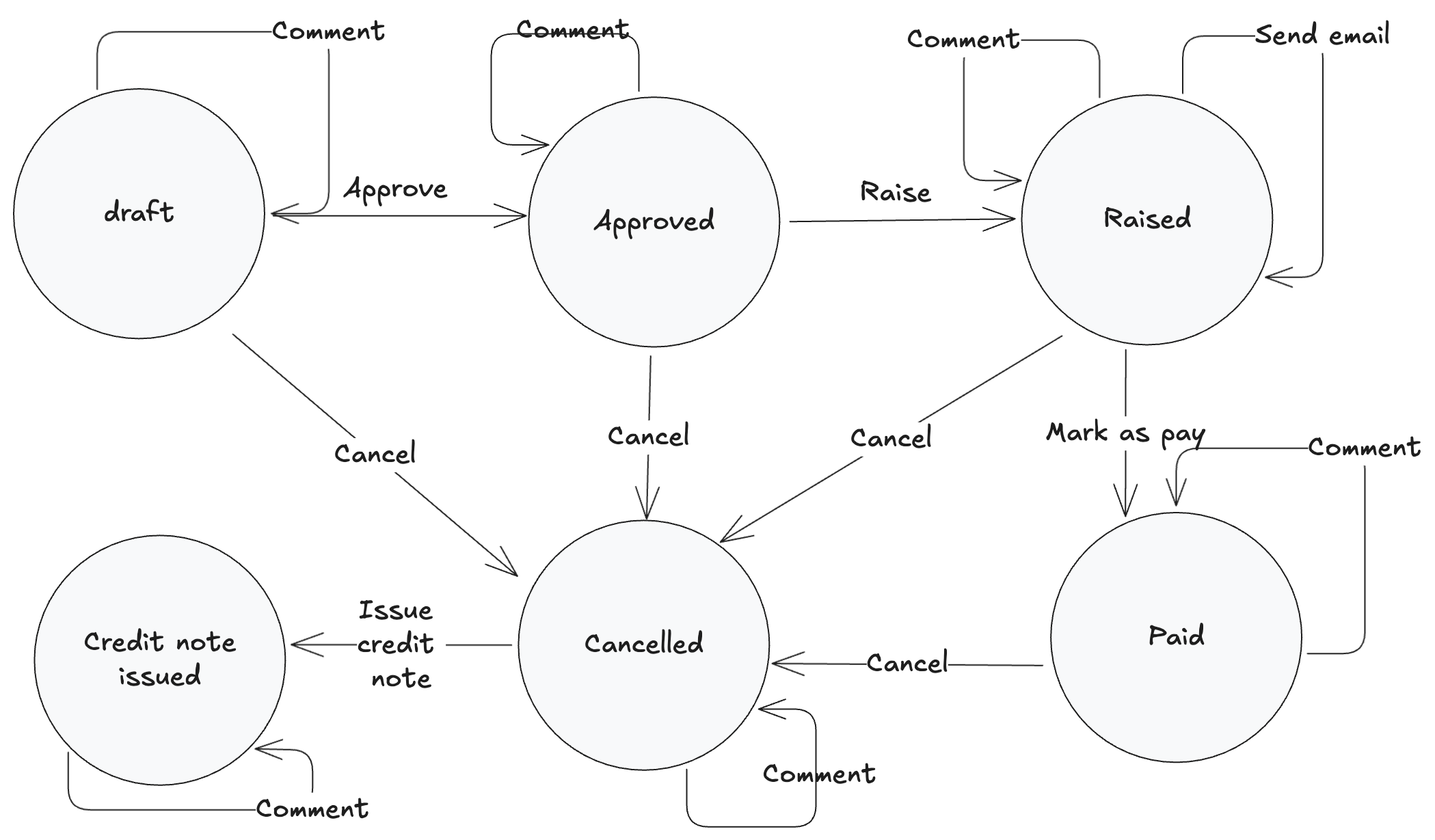
Invoices move through several states as part of their lifecycle:
* **Draft:** Initial state. Invoices can be edited in this stage.
* **Approved:** Invoice is reviewed and approved.
* **Raised:** Invoice is finalized, assigned an invoice number, and the PDF is generated.
* **Paid:** Payment has been received.
* **Cancelled:** Invoice is voided.
* **Credit Note Issued:** A credit note has been issued against the invoice.
You can view the complete audit trail for each invoice under **Invoice Details**.
***
### Invoice Workflow
 ***
### Key Points
* An invoice number is assigned when the invoice is **Raised**; this is also when the invoice PDF is generated.
* Invoices can be edited while in the **Draft** stage.
* The invoice numbering prefix can be configured under **Settings** > **Invoice Templates**.
* The same HTML template is used for both invoices and credit notes. You can customize or upload any HTML-based template under **Invoice Templates**.
***
## Credit Notes
A **credit note** is issued to reverse or adjust an invoice, typically after an invoice is cancelled.
### Credit Note Workflow
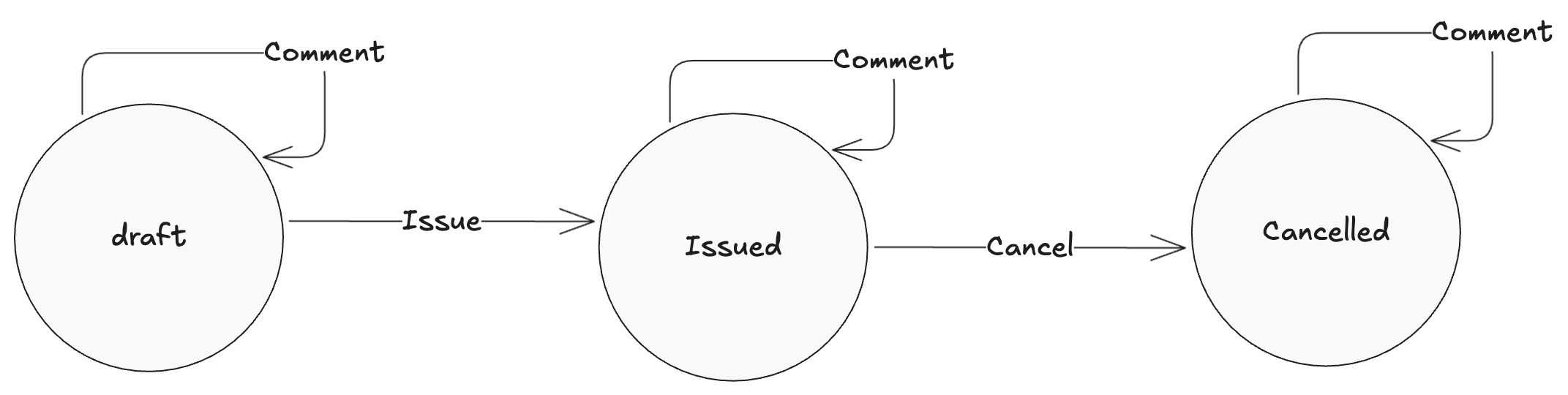
Credit notes have their own lifecycle:
* **Draft:** Initial state; can be edited and commented on.
* **Issued:** Credit note is finalized and issued.
* **Cancelled:** Credit note is voided.
Comments can be added at any stage for audit and collaboration.
***
### Key Points
* An invoice number is assigned when the invoice is **Raised**; this is also when the invoice PDF is generated.
* Invoices can be edited while in the **Draft** stage.
* The invoice numbering prefix can be configured under **Settings** > **Invoice Templates**.
* The same HTML template is used for both invoices and credit notes. You can customize or upload any HTML-based template under **Invoice Templates**.
***
## Credit Notes
A **credit note** is issued to reverse or adjust an invoice, typically after an invoice is cancelled.
### Credit Note Workflow
Credit notes have their own lifecycle:
* **Draft:** Initial state; can be edited and commented on.
* **Issued:** Credit note is finalized and issued.
* **Cancelled:** Credit note is voided.
Comments can be added at any stage for audit and collaboration.
 ***
### Key Points
* Credit notes can only be issued after cancelling an invoice.
* Credit note numbering starts with **CN-** by default, unless configured otherwise in **Invoice Templates**.
* The same HTML template is used for both invoices and credit notes, and can be customized under **Settings** > **Invoice Templates**.
***
For more details on setting up invoice templates, see [One time setup](../org-setup).
***
***
### Key Points
* Credit notes can only be issued after cancelling an invoice.
* Credit note numbering starts with **CN-** by default, unless configured otherwise in **Invoice Templates**.
* The same HTML template is used for both invoices and credit notes, and can be customized under **Settings** > **Invoice Templates**.
***
For more details on setting up invoice templates, see [One time setup](../org-setup).
***